Local AI Hardware
Fine-Tuning Gemma 4 on a MacBook M3 Pro: A Practical Guide
Last updated: 2026-05-25 — based on a real LoRA run on an 18GB M3 Pro
Fine-tuning a 4-billion-parameter language model used to mean renting GPU time. Now it fits on a laptop. Here's what I learned doing it on an 18GB MacBook M3 Pro, using Apple's MLX framework with LoRA — including the choices that mattered and the dead-ends I avoided.
Developer's Note
Everything in this post is from one actual training run on my own machine, not a synthetic benchmark. If a setting cost me time, it's flagged. If a default worked, it's the one I kept.
What we'll build
A Gemma 4 model fine-tuned to write in a specific style (in my case, rap lyrics — but the same recipe works for any text style: customer support tone, code comments, journalism, fiction). The fine-tune runs in 1–2 hours on the laptop's own silicon and produces a small LoRA adapter (~30MB) that you load on top of the base model at inference time.
Specifically what we'll use:
- Model: Gemma 4 E4B (4.5B effective parameters), 4-bit MLX quantized
- Method: LoRA (technically QLoRA since the base is 4-bit) via
mlx-lm - Hardware: MacBook M3 Pro, 18GB unified memory
The hardware reality
The M3 Pro has 18GB of unified memory shared between CPU and GPU. This is the binding constraint, and it shapes every other decision. Rough memory budget during training:
- macOS + background apps: 4–6GB
- Model weights: variable — this is the big one
- Activations, gradients, optimizer state: 2–4GB
You have about 12–14GB for the model itself. That rules out the bigger Gemma 4 variants (26B MoE, 31B dense) and makes the smaller E2B and E4B variants the real options.
The critical choice: which Gemma 4 variant?
Gemma 4 ships in four sizes. For an 18GB Mac, only the smallest two are viable:
| Variant | Params | bf16 size | 4-bit size | Fits 18GB? |
|---|---|---|---|---|
| E2B | ~2.3B | ~4.5GB | ~1.5GB | comfortably |
| E4B | ~4.5B | ~9GB | ~3GB | tight at bf16, easy at 4-bit |
| 26B A4B | ~26B | ~52GB | ~16GB | no |
| 31B | ~31B | ~62GB | ~18GB | barely, not for training |
I went with E4B in 4-bit MLX format. Reasoning:
- Bigger model = better stylistic capacity
- 4-bit base means QLoRA training, which fits comfortably in memory
- Quality loss vs. bf16 LoRA is negligible for style transfer
- 4-bit MLX is also faster on Apple Silicon
Pick the right 4-bit variant
Not all mlx-community quants are equal. Gemma 4 E4B is multimodal
(text + vision + audio), and some converted versions retain the vision tower — which confuses
mlx_lm.lora, a text-only training path.
- ✅ Use:
mlx-community/gemma-4-e4b-it-OptiQ-4bit— text-only, loads withmlx_lm.load - ❌ Avoid for training:
mlx-community/gemma-4-e4b-it-4bit— multimodal, requiresmlx_vlm
This distinction cost me an afternoon. The vanilla 4-bit version looks right, but
mlx_lm.lora will error or produce nonsense once it hits the vision weights.
Why MLX, not PyTorch
There are two viable paths on Apple Silicon:
- PyTorch with the MPS backend
- Apple's MLX framework
For fine-tuning, MLX wins. It's faster on Apple Silicon, uses memory more efficiently (it's
designed around unified memory), and mlx-lm is the most polished LoRA training stack
on Mac. PyTorch+MPS still has rough edges — silent CPU fallbacks, missing ops, occasional precision
bugs. If you've used huggingface_hub and transformers, MLX feels familiar:
same dataset format (JSONL), similar command-line tools.
The recipe
1. Environment
brew install [email protected]
python3.11 -m venv .venv && source .venv/bin/activate
pip install mlx-lm datasets huggingface_hub
hf auth login  # accept Gemma license on huggingface.co first
2. Download model + data
hf download mlx-community/gemma-4-e4b-it-OptiQ-4bit --local-dir ./gemma-4-e4b-4bit
hf download <your-dataset> --repo-type dataset --local-dir ./your_data
3. Format your data
mlx-lm expects JSONL files with a text field, formatted with Gemma's
chat template:
import json, os
from datasets import load_dataset

ds = load_dataset("./your_data", split="train").shuffle(seed=42).select(range(2000))

def fmt(ex):
    return {
        "text": f"<start_of_turn>user\n{ex['prompt']}<end_of_turn>\n"
                f"<start_of_turn>model\n{ex['response']}<end_of_turn>"
    }

os.makedirs("data", exist_ok=True)
rows = [fmt(ex) for ex in ds]
split = int(len(rows) * 0.9)
with open("data/train.jsonl", "w") as f:
    for r in rows[:split]: f.write(json.dumps(r) + "\n")
with open("data/valid.jsonl", "w") as f:
    for r in rows[split:]: f.write(json.dumps(r) + "\n")
The chat template matters. Gemma uses <start_of_turn> /
<end_of_turn> tags — using the wrong format wastes training cycles teaching the
model formatting it should already know.
4. Smoke test
Never commit to a multi-hour training run without first verifying 10 iterations work:
python -m mlx_lm.lora --model ./gemma-4-e4b-4bit --train \
  --data ./data --iters 10 --batch-size 1 --grad-checkpoint \
  --max-seq-length 1024 --adapter-path ./test_adapters
If this errors, fix the error before committing to the full run.
5. Real training
caffeinate -i python -m mlx_lm.lora --model ./gemma-4-e4b-4bit --train \
  --data ./data --iters 1000 --batch-size 1 --grad-checkpoint \
  --max-seq-length 1024 --learning-rate 1e-4 --num-layers 16 \
  --save-every 100 --adapter-path ./adapters 2>&1 | tee train.log
A few flags worth understanding:
caffeinate -i— prevents macOS from sleeping. Critical for runs longer than 30 min.--grad-checkpoint— trades compute for memory. Essential on 18GB.--max-seq-length 1024— cap context during training. Most text fits comfortably.--num-layers 16— apply LoRA to 16 transformer layers. More = better quality, more memory.--save-every 100— checkpoint frequently. If training crashes at iter 800, you don't lose everything.
Expected timing on M3 Pro 18GB: roughly 1.5–2 hours for 1000 iterations with these settings.
6. Test the result
from mlx_lm import load, generate
from mlx_lm.sample_utils import make_sampler, make_logits_processors

model, tokenizer = load("./gemma-4-e4b-4bit", adapter_path="./adapters")

messages = [{"role": "user", "content": "your test prompt here"}]
prompt = tokenizer.apply_chat_template(messages, add_generation_prompt=True, tokenize=False)

sampler = make_sampler(temp=0.85, top_p=0.92)
procs = make_logits_processors(repetition_penalty=1.15)
generate(model, tokenizer, prompt=prompt, max_tokens=400,
         sampler=sampler, logits_processors=procs, verbose=True)
Always compare fine-tuned output against the base model on the same prompt. If they look
identical, training didn't take. Check train.log — validation loss should drop
visibly. Mine went from roughly 3.0 to 1.5 over 1000 iterations.
What I'd do differently
Match training data to actual use case. I trained on
(prompt → full response) pairs, then realized I wanted multi-turn editing
capability ("make line 3 darker"). The model can sort of do this — base Gemma 4 has
instruction-following baked in — but it pulls toward dumping full responses when I want
surgical edits. The training data should mirror the interaction pattern you actually want,
including multi-turn examples if you'll use it conversationally.
Start with fewer iterations. I jumped to 1000 iters. In hindsight, 300–500 with frequent checkpoints would have let me catch dataset issues earlier. With small LoRA fine-tunes, most of the learning happens in the first 200–300 steps anyway.
Watch memory pressure, not just memory used. Activity
Monitor's "Memory Pressure" panel tells you if macOS is starting to swap to SSD. Green is fine.
Yellow means slowdown is coming. Red means stop and reduce something — drop --num-layers
or --max-seq-length.
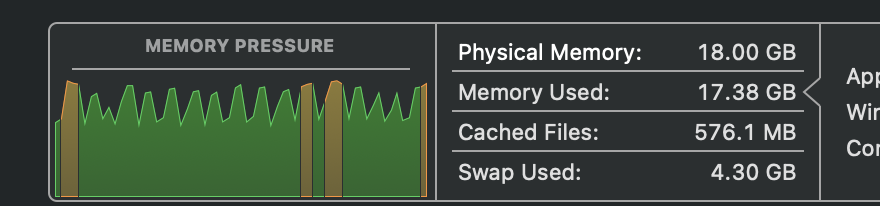
--num-layers from 16 to 12.
Gotchas worth knowing
- Multimodal weights confuse text training. Covered above with the OptiQ vs. vanilla 4-bit distinction.
- MPS fallback hides bugs. If you're using PyTorch+MPS instead of MLX, leaving
PYTORCH_ENABLE_MPS_FALLBACK=1set hides silent CPU fallbacks that tank training speed. - Pre-download everything. Don't start a training run anywhere you might lose internet — airport wifi, café, train. Model weights, dataset, and pip dependencies should all be local before you commit.
- Battery dies fast. Active training on M3 Pro drains a full battery in roughly 2 hours. Plan for power.
When to fine-tune locally vs. rent a GPU
Local on M3 Pro makes sense when:
- You're learning the workflow
- Dataset is small (<10k examples)
- You want to iterate quickly on different recipes
- Cost matters more than wall-clock time
Rent an A100 on Runpod or Modal when:
- You want a bigger model (Gemma 4 31B, etc.)
- Training data is large (100k+ examples)
- You need full-precision (bf16) training without compromise
- You're shipping to production
A 1000-iter LoRA run on M3 Pro is ~2 hours. The same run on an A100 is ~15 minutes and costs about $0.30. For dataset experimentation, the laptop is fine. For the final training pass, cloud is cheaper than your time.
What's next
LoRA is just the first step. From here you can:
- Build a synthetic dataset (use a frontier model to generate training pairs in your target style)
- Stack multiple adapters — one for tone, one for format — and swap them independently
- Quantize the merged model and ship it via Ollama for local-only inference
- Chain it with other models (in my case, feeding lyric output into a music generation model for full audio)
The barrier between "I have an idea" and "I have a fine-tuned model running on my own machine" is now a weekend of work. That's wild.
Check Your Hardware First
Before downloading multi-gigabyte model files, validate your setup with Can I Fine-Tune LLM. Select Gemma 4 E4B and enter your Mac's unified memory — it will tell you whether QLoRA, LoRA, or full fine-tuning is realistic.
Check if your Mac can fine-tune Gemma 4 — free, no signup
Can I Fine-Tune LLM — Free Calculator →